How To Improve Core Web Vitals on Your WordPress Site
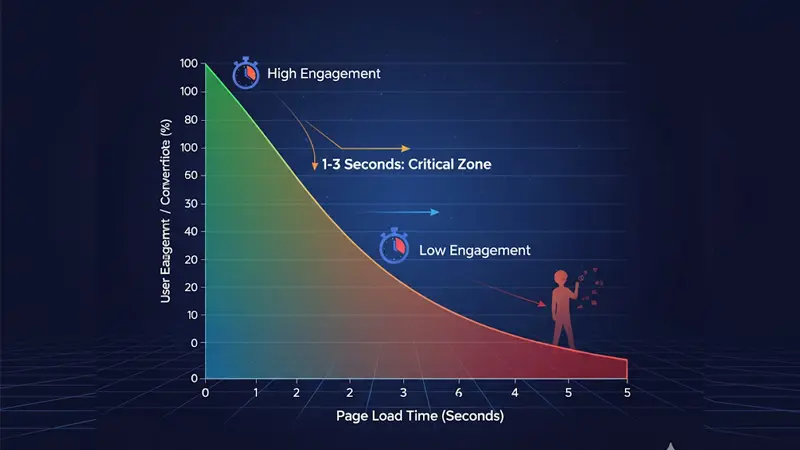
In today’s digital world, the average attention span is shorter than ever. If a page doesn’t load within a few seconds, users don’t wait — they leave.
That’s why Core Web Vitals have become one of the most important ranking and experience signals for every website, especially those built on WordPress, the world’s most popular CMS.
At Masamind, we’ve seen hundreds of sites where improving performance metrics directly boosted engagement, lead conversions, and search visibility.
In this guide, we’ll explain what Core Web Vitals are, how to measure them, and exactly how to improve each metric for better SEO and user experience.
What Are Core Web Vitals?
Core Web Vitals are a set of user experience metrics defined by Google that measure how fast, stable, and responsive a web page feels for real visitors.
They are part of Google’s Page Experience signals, which directly influence rankings on both desktop and mobile searches.
There are three main metrics:
| Metric | Measures | Good Score | Needs Improvement | Poor |
|---|---|---|---|---|
| LCP (Largest Contentful Paint) | Loading performance — how fast the main content appears | ≤ 2.5s | 2.5–4.0s | > 4.0s |
| INP (Interaction to Next Paint) | Interactivity — how quickly the site responds to clicks or input | < 200ms | 200–500ms | > 500ms |
| CLS (Cumulative Layout Shift) | Visual stability — how stable elements are during load | < 0.1 | 0.1–0.25 | > 0.25 |
These are not abstract technical stats — they reflect real user experience. When a visitor clicks a button, scrolls a gallery, or reads an article, these metrics define how smooth that feels.
Why Core Web Vitals Matter for Business
Speed is invisible, but it affects everything:
- SEO Rankings → Google prioritizes sites with good Core Web Vitals.
- Conversion Rate → A one-second delay can reduce conversions by 7–10%.
- User Trust → Fast, stable sites feel more professional.
- Mobile Retention → On mobile, even minor delays make users abandon faster.
In short, performance is not just technical — it’s psychological.
People associate speed with credibility.
How To Measure Core Web Vitals on WordPress
Before optimizing, you need accurate data. There are two main data sources:
1. Field Data (Real-User Experience)
Field data comes from actual visitors using your site via Chrome browsers. It’s aggregated by Google through the Chrome User Experience Report (CrUX).
This data is used for ranking and appears in:
- Google Search Console → Core Web Vitals Report
Search Console Link
→ Gives you “Good,” “Needs Improvement,” and “Poor” URLs, separated by mobile and desktop.
→ Great for spotting patterns across multiple pages. - PageSpeed Insights (Field Section)
PageSpeed Insights
→ Shows field data if available for that URL.
Use field data for real-world monitoring. If your site has low traffic, field data may not appear yet — that’s when lab tools help.
2. Lab Data (Simulated Testing)
Lab tools simulate user experience under standard conditions to identify issues.
Best tools:
- Google PageSpeed Insights — quick snapshot of both field and lab data.
- Lighthouse (in Chrome DevTools) — deeper audit; includes render-blocking, script issues, and performance scoring.
- WebPageTest.org — highly detailed waterfall and real device testing.
- Chrome DevTools → Performance Panel — test responsiveness and layout shifts live.
These tools are invaluable during development and troubleshooting.
Understanding Each Core Web Vital in Detail
Let’s break down how to improve each metric effectively.
1. Largest Contentful Paint (LCP) — Loading Speed
Definition:
LCP measures how long it takes for the largest visible element (hero image, main text block, or banner) to load.
Goal: ≤ 2.5 seconds
Common Causes of Poor LCP:
- Heavy images or videos on top of the page
- Render-blocking JavaScript or CSS
- Slow hosting or no CDN
- Too many fonts loading before content
- Page builder bloat
Fixes:
- Compress and resize images.
Use ShortPixel, Smush, or native WebP format. - Preload hero image and fonts.
<link rel="preload" as="image" href="hero.webp"> - Defer non-critical CSS/JS.
Most caching plugins can do this automatically. - Use a CDN (Content Delivery Network).
Cloudflare, BunnyCDN, or StackPath improve global load time. - Choose a fast, minimal theme.
GeneratePress, Astra, or Neve — avoid heavy sliders or large DOMs. - Upgrade hosting.
Managed WordPress hosting with caching (like Pressable or WP Engine) drastically improves LCP.
2. Interaction to Next Paint (INP) — Responsiveness
Definition:
INP measures how fast your site reacts after a user interacts (e.g., clicks or types).
Goal: < 200 milliseconds
Common Causes of Poor INP:
- Long-running JavaScript tasks
- Heavy animations or scroll effects
- Plugin conflicts
- Large DOM trees from page builders
Fixes:
- Audit JavaScript:
Use Chrome DevTools → Performance → Identify long tasks. - Minify and defer JS:
Use plugins like WP Rocket or FlyingPress. - Avoid blocking UI threads:
Defer third-party widgets (chat, analytics) to load after interaction. - Simplify navigation menus and dynamic effects.
- Keep WordPress, themes, and plugins updated — updates often include performance patches.
Pro tip: WooCommerce sites often struggle with INP — audit checkout and product filters for lag.
3. Cumulative Layout Shift (CLS) — Visual Stability
Definition:
CLS measures unexpected shifts in layout — for example, when text moves because an image or ad loads late.
Goal: < 0.1
Common Causes:
- Images or embeds without size attributes
- Ads or popups loading late
- Fonts switching mid-render
- Sticky headers or banners injected dynamically
Fixes:
- Always define width and height for images.
WordPress does this automatically if you use the built-in media uploader. - Reserve space for dynamic elements (cookie banners, ads).
- Use font-display: swap in CSS.
Or use a plugin like OMGF to self-host fonts. - Delay popups and widgets until after main content loads.
- Check embed scripts — YouTube, ads, and maps often cause late shifts.
Lab vs. Field Data — How They Differ
- Lab data → synthetic, good for debugging during development.
- Field data → real-world experience used for Google ranking.
In WordPress optimization, use lab tools to fix, and field tools to verify improvements.
Field data usually updates in Google Search Console within a few days to weeks after real users visit.
Tools for Continuous Monitoring
- PageSpeed Insights API — automate regular testing for key pages.
- Google Search Console Alerts — get notified if pages drop below “Good.”
- Chrome DevTools (Performance Tab) — test while editing templates.
- Web Vitals Chrome Extension — live browser scores.
Download Extension
Maintenance Plan for WordPress Core Web Vitals
Improving Core Web Vitals is not a one-time task.
Here’s a monthly process that keeps your site fast and compliant:
| Frequency | Task | Tool |
|---|---|---|
| Weekly | Run PageSpeed Insights for 2–3 main pages | PSI / Lighthouse |
| Monthly | Check Core Web Vitals report in Search Console | GSC |
| Quarterly | Audit plugins and remove unused ones | Dashboard |
| After major updates | Recheck INP and CLS | PSI / CrUX |
| Continuous | Use CDN and caching | Host-level |
Advanced Optimization Tips (for developers)
- Critical CSS: Inline only essential CSS for above-the-fold content.
- Preload key requests: Fonts, hero image, and main stylesheet.
- Reduce main-thread work: Split scripts or move logic server-side.
- HTTP/3 and Brotli compression: Enable at server or CDN level.
- Edge caching: Serve static pages from locations close to users.
Tools like NitroPack or FlyingPress can automate several of these advanced steps safely.
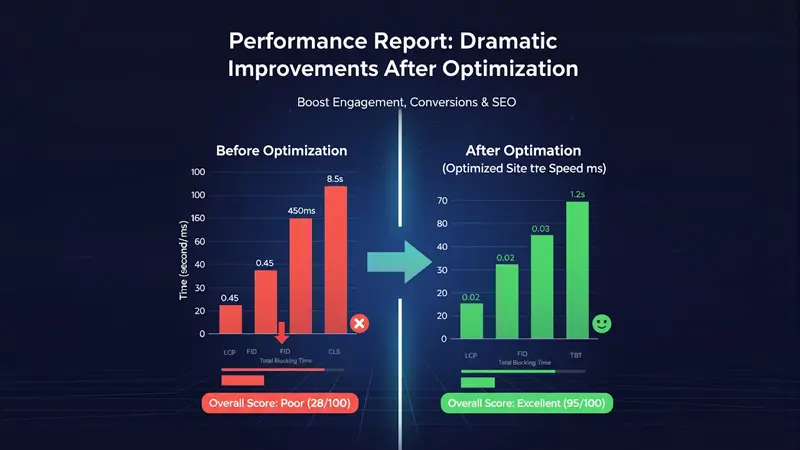
Example: Real Impact of Optimization
A client’s eCommerce site initially scored:
- LCP: 4.2s
- INP: 380ms
- CLS: 0.22
After optimizing images, scripts, and hosting setup:
- LCP: 1.9s
- INP: 160ms
- CLS: 0.04
- Bounce Rate: dropped by 36%
- Conversion Rate: increased by 18%
That’s the power of performance — measurable business outcomes.
Final Thoughts
Speed is not just a technical achievement; it’s a business strategy.
When your website loads fast, feels responsive, and stays visually stable, users subconsciously trust your brand more.
In every market and every platform — speed still wins.
If your WordPress site feels slow or inconsistent, it’s time to audit your Core Web Vitals.
At Masamind, we help brands fix performance issues at every level — from code to content delivery — ensuring your site meets Google’s modern standards.
Request a free performance snapshot → masamind.com/contact
Let’s Connect
Have a project in mind or need a stunning website?