Headless WordPress: What It Is, How It Works, and When to Use It

For over a decade, WordPress has powered more than 40% of all websites.
It’s flexible, easy to use, and perfect for managing content at scale.
But as the web evolves with faster frameworks, mobile-first designs, and multi-platform publishing — traditional WordPress setups sometimes struggle to keep up.
That’s where Headless WordPress comes in.
It’s not just a buzzword it’s a smarter, modular way to build modern digital experiences that perform faster and scale further.
In this article, we’ll explain what Headless WordPress is, how it works, its pros and cons, and how to decide whether it’s right for your business.
What Is Headless WordPress?
In a traditional WordPress setup, the CMS handles both content and presentation.
When a visitor loads your site, WordPress fetches content from the database, renders it with PHP, and serves HTML to the browser all in one system.
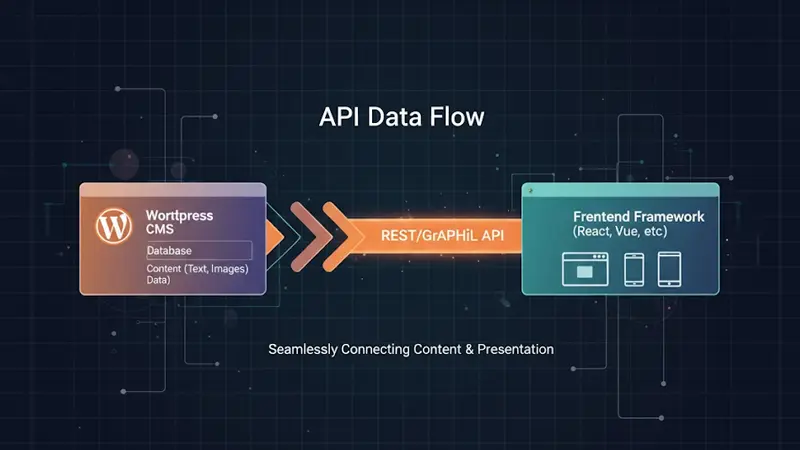
In a headless setup, WordPress manages only the content (the backend) while a separate frontend framework such as React, Next.js, or Vue.js handles the design and display.
The two communicate through APIs, typically the WordPress REST API or WPGraphQL.
Think of it like this:
WordPress becomes your “content brain,” while the frontend acts as the “face” that presents your content anywhere — on websites, apps, or even smart devices.
How Headless Architecture Works
A headless website separates three layers:
- Backend (CMS): WordPress remains the content management system.
- API Layer: Data flows through REST API or GraphQL endpoints.
- Frontend: Built with JavaScript frameworks like React, Next.js, Gatsby, or Nuxt.js.
When a user visits your site, the frontend requests content via the API and renders it dynamically.
This architecture allows developers to use modern front-end technologies while keeping WordPress as a trusted CMS.
Why Go Headless?
The main appeal of headless WordPress is performance and flexibility.
Here are the biggest advantages:
1. Speed and Performance
Frontends built with frameworks like Next.js or Nuxt.js can pre-render pages (using Static Site Generation or Server-Side Rendering).
This results in near-instant page loads and higher Core Web Vitals scores.
Even large content-heavy websites — like Al Jazeera, which uses a headless WordPress setup — deliver fast, reliable experiences worldwide.
2. Freedom in Design
Traditional WordPress themes can feel restrictive.
Headless lets developers design from scratch using any frontend framework.
This means:
- Unlimited control over UI/UX
- Easier integration with motion and animations
- Better brand consistency across multiple digital platforms
3. Multi-Channel Publishing
Because content is delivered through APIs, it can appear anywhere:
- Websites
- Mobile apps
- Smart TVs
- Digital kiosks
- Even IoT devices
You manage all content once in WordPress, and it appears everywhere automatically.
4. Enhanced Security
By separating the frontend from the backend, you reduce direct access to WordPress admin endpoints.
That means fewer vulnerabilities from brute-force attacks or plugin exploits.
5. Scalability and Developer Agility
When traffic grows, you can scale the frontend independently of the backend.
Teams can work on design updates without touching CMS data — and vice versa.
It’s a clean, modular system built for long-term growth.
The Drawbacks of Going Headless
No system is perfect.
While headless WordPress is powerful, it also comes with challenges that matter for real projects.
1. Higher Development Cost
Building and maintaining two separate environments (CMS + frontend) costs more time and money.
2. Plugin Compatibility Issues
Many WordPress plugins (like Yoast SEO, WooCommerce, or Contact Form 7) rely on server-side rendering.
You’ll lose some plug-and-play functionality.
3. Technical Complexity
Your developers need JavaScript expertise — React, Next.js, GraphQL — not just PHP.
Small teams may find it harder to manage.4. More Maintenance
You’ll have to maintain two deployments:
- WordPress (backend updates, plugins)
- Frontend app (framework updates, API integrations)
When Should You Go Headless?
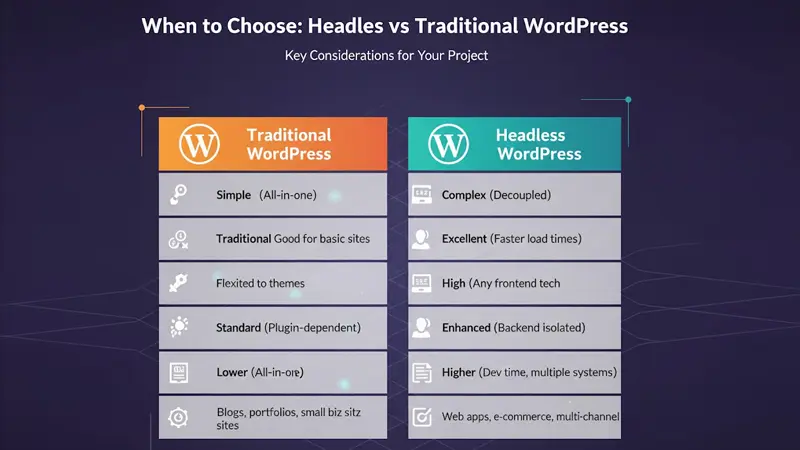
Going headless makes sense when your project demands performance, flexibility, or omnichannel delivery.
✅ Choose headless if:
- You’re running a high-traffic media site or eCommerce store.
- You want to publish content across multiple platforms.
- You have a front-end team skilled in modern JavaScript.
- You need a fully custom design without WordPress theme limits.
❌ Stick to traditional WordPress if:
- Your site is small to mid-sized.
- You rely heavily on third-party plugins.
- You have limited technical resources.
- You prioritize low maintenance and simplicity.
Popular Tools for Headless WordPress
| Function | Tools / Platforms |
|---|---|
| API Layer | REST API, WPGraphQL |
| Frontend Frameworks | Next.js, Gatsby, Nuxt.js, Remix |
| Hosting | Vercel, Netlify, Cloudflare Pages |
| CMS Enhancements | WP Engine Atlas, Faust.js, Frontity |
| Security & CDN | Cloudflare, Akamai, Fastly |
Each combination serves different needs — for instance, Next.js + WPGraphQL + Vercel is a very popular stack for scalable, performance-first websites.
Real-World Example: Al Jazeera
Al Jazeera migrated to a headless WordPress architecture using WordPress VIP.
Their setup improved global load speed, reduced downtime, and allowed their editorial team to manage content across multiple regions in real time.
This approach gave them faster publishing workflows and a modern web experience without leaving WordPress behind.
Masamind’s Perspective
At Masamind, we see Headless WordPress as the bridge between content and innovation.
It’s not about replacing WordPress — it’s about evolving it for the modern web.
We recommend headless solutions when performance, scalability, or multi-platform delivery are essential.
For simpler business sites, traditional WordPress remains a more efficient choice.
The smartest agencies don’t follow trends — they choose the right technology for the right project.
Final Thoughts
Headless WordPress offers the best of both worlds — the simplicity of WordPress and the power of modern frameworks.
If your goal is long-term scalability, global content delivery, or custom experiences beyond what traditional themes can handle, it’s worth exploring.
But if your goal is to launch quickly, keep costs low, and manage everything easily — traditional WordPress is still the unbeatable option.
At Masamind, we help brands choose the right path and build for both.
Whether you want speed, security, or freedom, we’ll help you design a future-proof website architecture that fits your needs.
Let’s Connect
Have a project in mind or need a stunning website?